FFoundational
The bedrock material every later lesson assumes.
Why authentication is hard. What a domain controller actually does. The why behind the protocol — not the syntax of the tool that exploits it.
Example lessonKerberos AuthenticationLearn to turn offensive security findings into clear reports, interview answers, and client-ready explanations — with guided lessons, real attack paths, and a study kit that makes it stick.
1.Break in
Follow real Active Directory attack paths.
2.Explain the impact
Turn findings into client-ready language.
3.Write the finding
Lift report-ready wording into your deliverable.
The proposition
Lab platforms teach you to run the exploit. They give you the box, the flag, the writeup. That’s the minimum entry requirement. We start where they stop: the moment a hiring manager asks you to walk them through it. Most platforms stop at the exploit. We teach the technique — and the language to explain it.
Every lesson ships with an interview answer, a stakeholder explanation, and report-ready language — plus a paired quiz, flashcard deck, and brief. The communication layer that other training platforms leave out.
What interviewers usually hear
“I ran Rubeus, got some hashes, threw them at hashcat, one cracked… and then I basically had domain admin.”
What you’ll learn to say
“Any authenticated user can request a service ticket for an account with an SPN. The ticket is encrypted with that account’s password hash — so one weak service password falls offline, with no alarms and no foothold on the domain controller.”
Three lesson types
Lessons come in three types: the concepts that underpin everything, the team-facing skills you’ll use every day, and the offensive techniques themselves — each one ending in the words to explain it.
Why authentication is hard. What a domain controller actually does. The why behind the protocol — not the syntax of the tool that exploits it.
Example lessonKerberos AuthenticationWalking a hiring manager through your last engagement. Briefing a stakeholder under pressure. The plain-English habits that build trust on every engagement.
Example lessonInterviewing for Offensive Security RolesEvery Technique lesson ends in three communication blocks for three audiences — the words you can actually say out loud in an interview, in a conversation with a stakeholder, or put in a report.
Example lessonPass the HashProduct preview
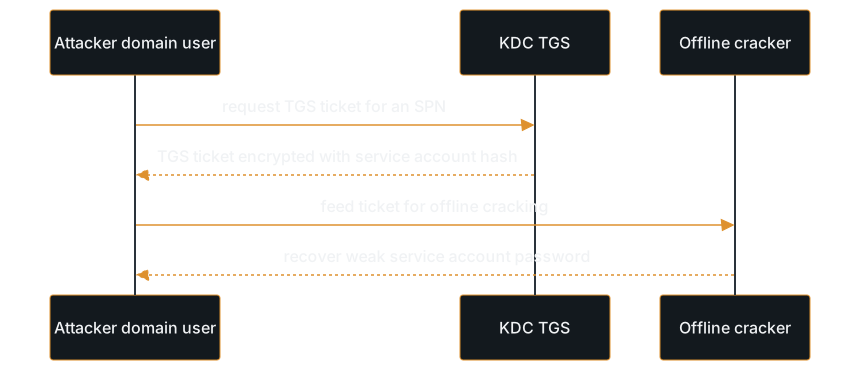
Techniques open with a diagram that shows how the attack flows, then end with three communication blocks: an interview answer, a stakeholder explanation, and report language. This is the actual lesson, rendered exactly as you see it in the app.
Interview answer
Kerberoasting takes advantage of how Kerberos issues service tickets. Any domain user can request a TGS ticket for any SPN, and that ticket is encrypted with the service account's password hash. The KDC does not check whether the user is authorized to use the service before issuing the ticket, so an attacker with any domain account can request tickets for every service account with an SPN, take those tickets offline, and crack the password. The cracking happens entirely offline, so there are no failed login attempts to trigger alerts.
Explain it to a stakeholder
Kerberoasting is a technique where an attacker with any employee-level domain account can extract encrypted password material for service accounts and attempt to crack those passwords offline, with no interaction with the systems those accounts protect.
Report language
Finding: Kerberoastable Service Accounts with Weak Passwords. During the assessment, the operator identified multiple user-based service accounts with registered Service Principal Names (SPNs). Offline password cracking recovered the plaintext password for a service account with local administrator access to three production database servers.
Severity: High.
Study Kit
Every lesson ships with three companion tools that make recall stick: a quiz, a flashcard deck, and a one-page brief. Below they appear exactly as they do inside lessons.
1.Why does Kerberoasting work?
Kerberos issues a service ticket without checking whether the requester needs the service. The ticket is encrypted with the service account's password hash, so once you have it, you can crack it offline.
Front
Service Principal Name (SPN)
Back
An identifier registered on a domain account that names a service the account runs (e.g., MSSQLSvc/host:port). Required for the KDC to issue Kerberos tickets to that service.
— from “Kerberoasting” · Free
The on-ramp
Not a trial, not a teaser, not seven days then a credit card. The whole path — every Technique, every callout, the full study kit. So you can decide whether the explanation actually clicks for you, before anything is at stake.
From weak password policy to full domain compromise — the most common real-world AD attack chain. Six Techniques, each with the three callout blocks and a printable brief.
01Reconnaissance
Enumerating password policy
02Initial Access
Password spraying
03Credential Access
Dumping LSASS
04Lateral Movement
Pass-the-hash
05Lateral Movement
WinRM execution
06Domain Compromise
DCSync
More than lessons
Tracks build connected understanding. Attack Paths chain techniques into a full compromise narrative — the kind of scenario question interviewers actually ask.
Tracks
Each track guides you through a deliberate sequence of lessons. They build on each other so you develop connected understanding, not isolated facts. Start here for a clear progression with milestones.
Explore TracksAttack Paths
Interviewers ask about individual techniques, but the harder questions are scenario-based: “walk me through how you’d compromise this environment.” Attack Paths chain techniques into an ordered sequence from initial access to objective — with the reasoning behind every step.
Explore Attack PathsWhy this platform exists
I earned the OSCP, OSEP, a CS degree, and spent years in labs and hands-on projects. That work built real skill, but it also exposed a gap I didn’t expect. My problem was never technical ability. It was explaining what I knew clearly.
Knowing how to do the work isn’t enough if you can’t articulate what you’re doing, why it matters, and how it fits into a real engagement. That communication gap costs people interviews, report credibility, and career momentum.
ExplainTheHack grew out of years of private notes turned into structured lessons — so people don’t just memorize techniques, they learn to understand them and explain them. That’s why this exists.

BSc. Computer Science · OSCP · OSEP · CRTO · CRTE
Premium
One subscription. Every technique, every attack path, and the words to explain all of it.