TTechniqueActive Directory
Abusing Misconfigured Certificate Templates
Learn to identify and exploit certificate templates where a low-privilege user can request authentication certificates for any identity in the domain, and explain why this common misconfiguration creates a direct path from standard domain user to domain compromise.
This lesson builds on
Hook
A standard domain user, with no cracked password, no exploit code, and no elevated privileges, can walk away from a single certificate request as Domain Admin. The certificate authority is not tricked and is not compromised: it issues the certificate exactly as its template instructs, and nothing about the request looks abnormal to the systems watching it. That single fact accounts for some of the most severe findings a modern Active Directory assessment can produce, and it comes down to a handful of settings on one certificate template.
Predict
If the CA is not broken and nothing is technically exploited, what would have to be true about the template itself to let it hand out someone else's identity on request?
Why it matters
Misconfigured certificate templates are among the most common and most impactful findings in AD CS assessments. A single template with the wrong combination of settings can allow any domain user to request a certificate that authenticates as Domain Admin, using the CA's own legitimate enrollment process. No exploit code is needed, no vulnerability is being exploited in the traditional sense, and the CA is functioning exactly as configured.
This makes template misconfiguration uniquely dangerous and uniquely difficult to communicate. The finding is not that something is broken. It is that something is configured in a way that grants far more power than anyone intended. Organizations that have never audited their AD CS templates often have this exact misconfiguration, sometimes on templates that have existed since the original deployment.
Key Concepts
- ENROLLEE_SUPPLIES_SUBJECT — the critical flag that allows the certificate requester to specify whose identity the certificate claims, rather than the CA enforcing that the certificate matches the requester
- Authentication-capable EKU — the certificate must include an Extended Key Usage that permits domain authentication (Client Authentication, Smart Card Logon, PKINIT Client Authentication, or Any Purpose) for the issued certificate to function as a credential
- No issuance gates — manager approval and authorized signature requirements are the controls that could prevent automatic issuance; when both are disabled, the CA issues the certificate immediately without human review
- Enrollment rights — the template's ACL must grant Enroll permissions to a group the attacker belongs to; Domain Users or Authenticated Users enrollment rights make the template accessible to every domain account
- Certificate-to-TGT chain — the issued certificate is used with PKINIT to obtain a Kerberos TGT for the specified identity, converting the certificate into standard domain authentication credentials
Theory
Preconditions
A valid domain user account with enrollment rights on the vulnerable template. The template must have all of the following: the ENROLLEE_SUPPLIES_SUBJECT flag enabled (allowing the requester to specify the certificate's identity), an Extended Key Usage that permits authentication (Client Authentication, Smart Card Logon, PKINIT Client Authentication, or Any Purpose), no manager approval requirement, and no authorized signature requirement. The CA must be an Enterprise CA listed in NTAuthCertificates.
Why it works
The CA is designed to follow templates. When a template says the requester can specify the subject identity, the CA does not second-guess that decision: it issues the certificate with whatever identity the requester provides. The attack works because the CA is doing exactly what it was configured to do.
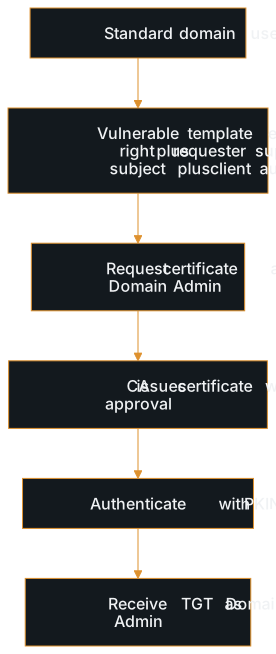
The template combines two things that should not coexist: the ability for any user to enroll and the ability for the enrollee to choose any identity. The resulting certificate is legitimate from the CA's perspective: it is signed by a trusted authority and contains valid authentication properties.
Attacker gain
A certificate that authenticates as any identity in the domain. The attacker requests a certificate specifying a privileged identity, typically Domain Admin, and uses PKINIT to obtain a TGT for that identity. This is functionally equivalent to knowing the target's password, but the certificate persists through password resets and can remain valid for the template's entire validity period, often months or years.
Where it fits
This technique typically converts a low-privilege domain foothold into domain compromise in a single step. After gaining any domain user account, through password spraying, Kerberoasting, or initial access, the attacker enumerates AD CS templates for this misconfiguration. If found, it provides the most direct privilege escalation path available: from standard user to Domain Admin through a single certificate request.
Tools / examples
- Certipy find -vulnerable: enumerates AD CS templates from Linux and flags those vulnerable to this misconfiguration, showing enrollment rights, subject name flags, and EKU settings
- Certify.exe find /vulnerable: Windows equivalent that queries AD for vulnerable templates and displays the specific conditions that make each template exploitable
- Certipy req -template <name> -upn administrator@domain.local: requests a certificate using the vulnerable template with an alternate Subject Alternative Name specifying the target identity
- Certipy auth -pfx <cert.pfx>: authenticates using the obtained certificate via PKINIT to retrieve a TGT and NT hash for the specified identity
Defender view
- Audit all certificate templates for the ENROLLEE_SUPPLIES_SUBJECT flag combined with authentication-capable EKUs: this combination should almost never exist on templates accessible to standard users
- Restrict enrollment rights to the minimum required groups: replace Domain Users or Authenticated Users with specific security groups that actually need to use each template
- Enable manager approval on any template that allows subject specification: this adds a human review gate that prevents automatic certificate issuance
- Monitor certificate enrollment logs (Event ID 4887) for certificates where the subject differs from the requester: this is the direct indicator that an attacker or misconfiguration has allowed identity substitution
Communication
Explain it to a stakeholder
Your certificate authority has a template, essentially an order form, that lets anyone in the organization request an identity document claiming to be any other person, including administrators. The document is automatically issued without review. An attacker with any employee account can use this to obtain credentials for your most privileged accounts. The fix is straightforward: change the template settings so the system verifies the requester's identity rather than letting them choose it. No systems need to be replaced. Only the template configuration needs to be tightened.
Report language
Finding: Misconfigured Certificate Template Allows Arbitrary Identity Certificate Requests. The certificate template [template name] on CA [CA name] is configured with ENROLLEE_SUPPLIES_SUBJECT enabled, Client Authentication EKU, and enrollment rights granted to [group]. This allows any member of [group] to request a certificate for any identity in the domain, including Domain Admin, without manager approval. An attacker exploiting this misconfiguration can obtain a TGT for any user via PKINIT, achieving immediate domain compromise from a standard domain user account.
Severity: Critical.
Recommendation: Disable the ENROLLEE_SUPPLIES_SUBJECT flag on this template. If subject specification is required for legitimate use, restrict enrollment to a dedicated security group and enable CA manager approval.
Common weak answers
- Describing this as 'hacking the CA': the CA is not being exploited; it is functioning exactly as the template instructs it to, which is the entire point of the finding
- Listing ESC numbers without explaining what the misconfiguration actually is: saying 'this is an ESC1' communicates nothing to anyone who does not already know the taxonomy
- Not explaining the certificate-to-authentication chain: the certificate alone is not the impact; the impact is that the certificate grants a TGT for any identity through PKINIT
- Failing to distinguish this from template permission abuse: this attack exploits a pre-existing misconfiguration; the attacker does not modify the template, they use it as it already exists
Interview answer
The most common AD CS finding is a certificate template that combines three things: any domain user can enroll, the requester can specify the certificate's identity, and the certificate carries an authentication-capable EKU. When all three are present, I can request a certificate claiming to be Domain Admin, and the CA issues it, because the template tells it to. I take that certificate, authenticate with PKINIT, and get back a TGT for Domain Admin.
The CA is not compromised in any of this. It is doing exactly what the template configuration instructs it to do, which is why the fix is changing the template settings rather than patching or replacing the CA. That distinction, misconfiguration versus vulnerability, is usually what separates a strong answer from a weak one.
Follow-up questions
- If the vulnerable template has enrollment rights restricted to Domain Computers instead of Domain Users, does that change how you would approach the attack?
- After exploiting this misconfiguration, how long does the certificate remain valid, and what would the organization need to do to fully remediate?
- How would you explain to a client that their CA is not compromised but their certificate templates represent a critical vulnerability?
Next up
The opening question resolves here: the template itself supplies the answer. ENROLLEE_SUPPLIES_SUBJECT lets the requester name the identity, an authentication-capable EKU makes that identity usable for login, and the absence of manager approval or an authorized-signature requirement means no person ever reviews the request before the CA issues it. Put those settings together and the CA is not tricked into anything: it is following its own configuration to the letter. Carry the broader question forward rather than the specific technique: how many other legitimate systems in your environment have a similarly quiet setting, buried a few clicks deep in a configuration screen, that quietly hands out more trust than anyone intended?