FFoundationalActive Directory
Active Directory Structure
Active Directory is the identity and access backbone of most enterprise Windows networks. This lesson explains how AD organizes users, computers, groups, and policies into a hierarchical structure, why that structure matters for both administrators and attackers, and how to explain it clearly in interviews.
Hook
Which is the real security boundary in Active Directory: the domain, or the forest? A single company might run one domain for its New York office and a separate domain for its London office, both inside the same forest. If an attacker fully compromises the London domain, does that put New York's resources at risk too, or does the domain line hold?
Predict
If one domain inside a multi-domain forest is fully compromised, does the forest's design mean the other domains fall too?
Why it matters
Active Directory is the starting point for almost every internal assessment and the foundation for almost every AD attack technique. If you cannot explain how AD is structured, you cannot explain where attacks happen or why they work. Understanding the hierarchy of forests, domains, organizational units, and objects is not just background knowledge; it is the map that every technique, every enumeration step, and every privilege escalation path operates on.
Key Concepts
- Forest — the outermost security and administrative boundary in AD; contains one or more domains that share a schema, global catalog, and trust relationships; a compromise of the forest root domain typically means full control of all domains in the forest
- Domain — a logical partition within a forest; each domain has its own database, its own set of policies, and its own domain controllers; domains within a forest trust each other by default
- Domain controller (DC) — a server that hosts the AD database (NTDS.dit), processes authentication requests (Kerberos, NTLM), and replicates directory changes to other DCs; the highest-value target in any AD assessment
- Organizational Unit (OU) — a container within a domain used to organize objects and delegate administration; Group Policy Objects are linked to OUs, which is how policies flow to specific sets of users or computers
- Objects — the basic units stored in AD: user accounts, computer accounts, groups, service accounts, Group Policy Objects, and more; every object has attributes (properties) and a unique distinguished name within the directory
- Groups — collections of objects used to simplify permission management; the most security-relevant are Domain Admins, Enterprise Admins, Server Operators, and any group with delegated administrative rights
- Schema — the blueprint that defines what types of objects can exist and what attributes they have; shared across all domains in a forest; modifications to the schema affect the entire forest
- LDAP — the protocol used to query and modify the AD directory; any authenticated domain user can query most of the directory, which is why basic AD enumeration requires only a standard user account
Theory
Core idea
Active Directory Domain Services (AD DS) is a directory service that stores information about every object in a Windows network environment, users, computers, groups, policies, and their relationships, and makes that information available for authentication, authorization, and management. It is organized as a hierarchical tree: a forest at the top, containing one or more domains, which contain organizational units, which contain objects.
The forest is the outermost security boundary. The domain is the primary administrative boundary. Organizational units are containers for grouping objects and applying policies. Every domain has at least one domain controller, a server that hosts the AD database and handles authentication requests.
Mental model
Think of Active Directory as a corporate org chart combined with a security system. The forest is the entire company. Domains are divisions or subsidiaries. Organizational units are departments within those divisions. Objects (users, computers, groups) are the people and assets that live inside those departments. Group Policy Objects are the corporate policies that get applied to departments and flow downward.
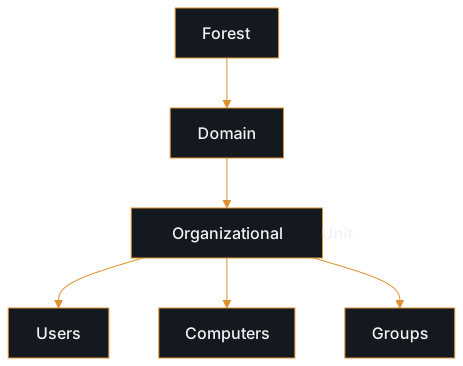
The critical insight for security work is that AD is simultaneously the authentication system, the authorization system, and the configuration management system for the entire network. Anything that can read the directory can learn the structure of the organization, and anything that can modify the directory can change who has access to what. This dual role is what makes AD both powerful and dangerous.
Common misunderstandings
- Thinking AD is just a user directory. The three roles above run through concrete mechanisms: Kerberos and NTLM handle authentication, ACLs on every object handle authorization, and Group Policy handles configuration. Treating AD as just a list of usernames misses why it is so central to security.
- Confusing forests and domains. A forest is the security boundary, not a domain. Domains within the same forest trust each other by default, which means compromising one domain often provides a path to others. The forest root domain has special significance because Enterprise Admins live there.
- Assuming only administrators can see AD data. Any authenticated domain user can query the vast majority of the AD database via LDAP. This is by design: it is how workstations find printers, how applications resolve service accounts, and how Kerberos locates services. It is also why a single compromised user account enables extensive enumeration.
- Treating organizational units as security boundaries. OUs are administrative containers, not security boundaries. The domain is a security boundary; the forest is the trust boundary. Placing sensitive objects in a separate OU does not isolate them from domain-wide attacks.
Real-world context
In a real assessment, you will encounter AD environments ranging from small single-domain setups to complex multi-forest architectures with dozens of domains and trust relationships. Understanding the structure lets you answer critical questions early: how many domains are there? Are there trust relationships that cross into other environments? Where are the domain controllers? Which groups have administrative access?
The structure you discover during enumeration becomes the map for the rest of the engagement. When you identify a service account in a privileged group, you need to understand what domain it belongs to and what that domain trusts. When you find a misconfigured GPO, you need to understand which OUs it applies to. When you explain findings to a client, you need to be able to describe where in their hierarchy the problem exists and what it affects.
Communication
Interview answer
Active Directory is a directory service that acts as the identity, authentication, and configuration backbone for Windows enterprise networks. It is organized hierarchically: forests contain domains, domains contain organizational units, and OUs contain objects like users, computers, and groups. The forest is the outermost security boundary, and domains within a forest trust each other by default. Every domain has domain controllers that host the AD database and handle authentication.
From a security perspective, the key insight is that AD is not just an address book; any authenticated user can query most of the directory via LDAP, which is why even a low-privilege account enables extensive enumeration. The structure of AD directly determines where attacks are possible, because group memberships control access, GPOs control configuration, and trust relationships determine how far a compromise can spread.
Follow-up questions
- What is the difference between a forest and a domain, and why does the distinction matter for security?
- Why can a standard domain user enumerate most of the AD database?
- What makes the domain controller the highest-value target in an AD environment?
- How do organizational units relate to Group Policy, and why does that matter for security?
- If you compromise one domain in a multi-domain forest, what does that typically mean for the other domains?
Next up
The opening question resolves here: the forest is the real security boundary, not the domain. Domains inside the same forest trust each other by default, so a full compromise of the London domain does put New York's resources within reach, even though the domain line looks like a wall on an org chart. The next lesson, Kerberos Authentication, opens the next gap: every one of those domains authenticates its users without ever sending a password across the network again after the first login, so what is a workstation actually handing a file server instead?
Study Kit
Quick Reference
Test Your Understanding
Reinforce Key Concepts
Further Reading
- Active Directory Domain Services Overview
Microsoft · Official Microsoft reference for AD DS architecture, including schema, global catalog, and replication
- Active Directory Schema
Microsoft · Microsoft reference for the AD schema that defines object classes and attributes: the foundation for understanding what AD objects are
- Security Principals in Active Directory
Microsoft · Microsoft reference for security principals (users, groups, computers): the core object types that populate the AD hierarchy