FFoundationalActive Directory
Group Policy Objects
Group Policy Objects are the primary mechanism for centrally managing configuration across users and computers in Active Directory. This lesson explains what GPOs are, how they apply settings across the environment, why control over GPOs matters for security, and how to explain Group Policy clearly in interviews.
This lesson builds on
Hook
By eight in the morning the helpdesk queue already has thirty tickets, all describing the same overnight change: every laptop in the Marketing OU picked up a new desktop wallpaper, and the Windows Firewall on each one now blocks a port it never blocked before. Nobody scheduled a software deployment, and nobody logged into thirty machines individually to make the change by hand. Not one of them needed a reboot for the new settings to take hold, and the change reached every laptop in that OU at roughly the same moment.
Predict
What single object, edited once in one place, could reach every laptop in that OU without anyone touching the machines directly?
Why it matters
Group Policy is how organizations push configuration, security settings, software installations, and logon scripts to thousands of machines from a single point of control.
If you do not understand how GPOs work, you cannot explain why GPO-based findings matter or why control over a GPO is a significant security risk. GPOs that push weak settings weaken the entire scope they apply to, and GPOs that an attacker can modify become a mechanism for executing code across every system in their scope. Interviewers expect candidates to understand the configuration delivery mechanism, not just the individual settings.
Key Concepts
- GPO linkage — GPOs are linked to sites, domains, or OUs; a GPO linked to the domain applies to all users and computers in the domain; a GPO linked to an OU applies only to objects in that OU and its children
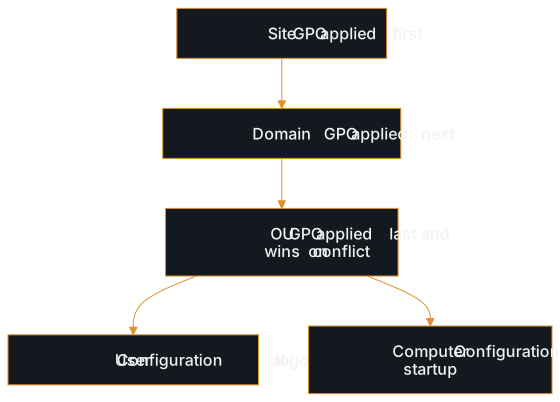
- LSDOU processing order — GPOs are applied in order: Local, Site, Domain, OU; later policies override earlier ones when settings conflict; this means an OU-level GPO overrides a domain-level GPO for the same setting
- Computer Configuration versus User Configuration — each GPO has two halves: Computer Configuration applies when the machine starts up (security settings, startup scripts, software installs) and User Configuration applies when a user logs in (logon scripts, desktop restrictions, folder redirection)
- SYSVOL — the shared folder on domain controllers where GPO templates and scripts are stored; replicated to all DCs; accessible to all authenticated users; contains the actual files (scripts, administrative templates) that GPOs reference
- Security filtering and WMI filtering — mechanisms that limit which users or computers within the linked scope actually receive a GPO; security filtering uses group membership, WMI filtering uses system properties like OS version
- Enforcement and inheritance blocking — domain administrators can enforce a GPO so it cannot be overridden by lower-level policies; OU administrators can block inheritance to prevent higher-level GPOs from applying; these mechanisms change the default processing order
- GPO permissions — GPOs are AD objects with their own DACLs; whoever has write access to a GPO can modify its settings; this is why GPO edit rights are a security-relevant permission
Theory
Core idea
A Group Policy Object is a collection of configuration settings stored in Active Directory and applied to users and computers based on where they sit in the directory hierarchy. GPOs are linked to sites, domains, or organizational units, and they apply their settings to every user and computer within the linked container. The settings themselves cover nearly every aspect of Windows configuration: security policies (password requirements, audit settings, user rights assignments), software deployment, logon and startup scripts, registry modifications, and application-specific configurations.
When a computer starts up or a user logs in, the system queries Active Directory for all GPOs that apply to it, downloads the settings, and enforces them. This processing happens periodically (every 90-120 minutes by default) so that configuration changes propagate without requiring manual intervention on each machine.
Mental model
Think of GPOs as broadcast policies in a corporate hierarchy. The CEO sets a company-wide policy (domain-level GPO). A division head sets a division-specific policy (OU-level GPO). A department manager sets a department policy (nested OU-level GPO). When there is a conflict, the more specific policy wins by default: department overrides division, which overrides company-wide. This is the LSDOU processing order: Local, Site, Domain, OU, with later policies taking precedence.
GPOs are not just administrative tools; they are a centralized code execution mechanism. A GPO linked to a domain applies to every computer in that domain. If an attacker can modify that GPO, they can push a scheduled task, a startup script, or a registry change to every machine in scope. Control over a GPO is effectively control over every system it applies to.
Common misunderstandings
- Thinking GPOs only manage desktop wallpapers and printer mappings. GPOs control security-critical settings: password policies, user rights assignments (who can log in to domain controllers, who can debug processes), audit policies, Windows Firewall rules, software restriction policies, and script execution. A misconfigured GPO can weaken security across every system it applies to.
- Assuming GPO changes require reboots. Most GPO settings are re-applied during periodic background refresh (every 90-120 minutes). Security policy settings, registry changes, and software deployment policies update without user intervention. Some settings (like software installation) do require a restart, but the majority propagate automatically.
- Conflating GPO creation with GPO application. Creating a GPO does nothing by itself; the GPO must be linked to a site, domain, or OU to take effect. A GPO can exist in the directory without being linked anywhere, and it can be linked to multiple containers simultaneously.
- Not understanding that GPOs are AD objects with their own permissions. A GPO has a DACL just like any other AD object, and write access to one is a security-relevant permission in its own right, not just an administrative convenience. GPO edit rights are frequently found on groups that were not intended to have that level of control.
- Ignoring SYSVOL as an attack surface. GPO scripts and templates are stored in SYSVOL, which is readable by all authenticated users. An attacker can read GPO scripts to find hardcoded credentials, scheduled task configurations, or software deployment paths. If they can write to SYSVOL (through GPO edit rights or SYSVOL permission misconfiguration), they can modify scripts that execute on target systems.
Real-world context
On real assessments, GPOs surface in multiple ways. During enumeration, you review GPOs to understand what security settings are enforced: password policies, audit configurations, user rights assignments. You check SYSVOL for scripts that contain hardcoded credentials or reveal internal infrastructure. You look for GPOs where your compromised account or group has edit rights, because modifying a GPO linked to a high-value OU is a path to code execution on those systems.
When reporting findings, GPO-related issues need to be explained in terms of scope and impact: a weak password policy GPO on the domain affects every user; a GPO with overly permissive edit rights on the Servers OU affects every server in that OU. Clients understand 'this group can push a scheduled task to every domain controller' much better than 'write access to GPO CN={GUID}.'
Communication
Interview answer
Group Policy Objects are the centralized configuration management mechanism in Active Directory that pushes settings to users and computers based on where they sit in the directory hierarchy. GPOs are linked to sites, domains, or OUs, and they apply settings, security policies, scripts, software deployments, registry changes, to every object in scope. They are processed in LSDOU order (Local, Site, Domain, OU), with more specific policies overriding broader ones.
From a security perspective, GPOs matter for two reasons. First, they define security baselines: password policy, audit policy, user rights assignments, and firewall rules are all delivered through GPOs, so weak GPO settings mean weak security across the entire scope. Second, GPOs are AD objects with their own permissions, and anyone who can edit a GPO can push configuration changes to every system it applies to, including scripts and scheduled tasks. Control over a GPO is effectively control over every machine in its scope.
Follow-up questions
- What is the LSDOU processing order, and why does it matter?
- If you found that your compromised account has write access to a GPO linked to the Domain Controllers OU, what could you do with it?
- What is SYSVOL, and why is it relevant to security assessments?
- How does a GPO linked at the domain level differ in scope from one linked to a specific OU?
- Why are GPO permissions a security concern separate from the settings the GPO delivers?
Next up
The tickets trace back to one object: the GPO linked to the Marketing OU. Someone with edit rights on it changed the wallpaper and the firewall rule once, and the periodic background refresh pushed both changes out to every laptop under that OU, no reboot and no individual login required. But a GPO's reach stops at the domain it lives in: it only applies to the sites, domains, and OUs it is linked to within that one domain's directory. The next lesson, Domain Trusts, opens the next gap: when the account you compromised sits in one domain and the resource you actually want sits in a different one, what decides whether that boundary holds?
Study Kit
Quick Reference
Test Your Understanding
Reinforce Key Concepts
Further Reading
- Group Policy Overview
Microsoft · Official Microsoft reference for Group Policy architecture, processing order, and management in Active Directory
- Group Policy Processing Order
Microsoft · Microsoft reference for GPO processing sequence, LSDOU precedence, and loopback processing: the mechanics behind how GPO conflicts resolve