FFoundationalActive Directory
Access Control Lists
Access control lists define who can do what to every object in Active Directory. This lesson explains what ACLs are, how they control permissions on AD objects, why they matter for delegated administration and attack surface, and how to explain them clearly in interviews.
This lesson builds on
Hook
What decides whether a help desk account with no admin group memberships can still reset a Domain Admin's password? The obvious guess is group membership, and most of the time that guess is right. But BloodHound routinely draws a straight line from an ordinary account to full domain compromise with no privileged group anywhere in the path, because something else, attached directly to the target object, is doing the granting.
Predict
If group membership is not the answer, what is attached to the Domain Admin account itself that gives the help desk account this power?
Why it matters
Every object in Active Directory has an ACL that determines who can read it, modify it, reset its password, change its group memberships, or take ownership of it.
If you cannot explain how AD permissions work, you cannot explain why ACL misconfigurations are among the most common and impactful findings in AD assessments. ACL-based attack paths are frequently discovered by tools like BloodHound, and interviewers expect candidates to understand the permission model that makes those paths possible, not just the tool output.
Key Concepts
- DACL (Discretionary Access Control List) — the list of permission entries on an AD object that determines who can perform which operations; this is what people usually mean when they say 'ACL' in an AD context
- ACE (Access Control Entry) — a single permission rule within a DACL; specifies a security principal, an access right (e.g., ReadProperty, WriteProperty, GenericAll), and whether the right is allowed or denied
- GenericAll — an ACE that grants full control over an object; a principal with GenericAll on a user can reset their password, modify their group memberships, change their attributes, or modify the DACL itself
- WriteDACL — an ACE that allows a principal to modify the access control list of an object; effectively grants the ability to give oneself or others any permission on that object
- WriteOwner — an ACE that allows a principal to change the owner of an object; the owner of an object can always modify its DACL, so WriteOwner is an indirect path to full control
- Inherited versus explicit ACEs — permissions can be set directly on an object (explicit) or inherited from a parent container like an OU; inherited permissions flow downward through the hierarchy, which is how delegated administration scales but also how overly broad delegations create unintended access
- SACL (System Access Control List) — the auditing counterpart to the DACL; defines which operations on the object generate audit events; relevant for defenders monitoring for ACL enumeration and modification
Theory
Core idea
An access control list in Active Directory is a set of rules attached to an object that defines which security principals (users, groups, computers) are allowed or denied specific actions on that object. Every AD object, every user account, computer account, group, organizational unit, and GPO, has a security descriptor that contains two ACLs: a DACL that controls access permissions and a SACL that controls auditing. The DACL is the one that determines who can do what.
It is made up of individual Access Control Entries (ACEs), each of which grants or denies a specific permission to a specific principal. When a user attempts an operation on an object, the system evaluates the DACL to determine whether the operation is permitted.
Mental model
Think of every AD object as a room with a door that has a detailed access list posted on it. The list says who can enter, who can rearrange the furniture, who can change the lock, and who can modify the list itself. The DACL is that posted list. Each line on the list is an ACE: one rule that says 'this person can do this specific thing.'
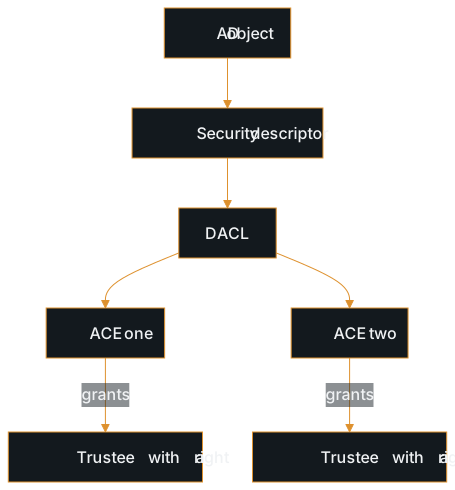
Some permissions are straightforward: read the object, write to a specific attribute. Others are powerful and subtle: GenericAll grants full control, WriteDACL allows rewriting the access list itself, and WriteOwner allows taking ownership, which effectively grants full control through an extra step.
The critical insight is that these permissions are not just administrative conveniences: they are the mechanism by which delegated control works in AD, and every delegation creates a potential path that an attacker can follow.
Common misunderstandings
- Thinking ACLs only apply to files and folders. In Active Directory, every object has an ACL: users, groups, computers, OUs, GPOs, the domain object itself. The permission model on AD objects is what enables delegated administration, and it is also what creates the ACL-based attack paths that BloodHound identifies.
- Assuming only administrators can have powerful ACL permissions. Delegated administration is common in enterprise AD environments: helpdesk teams may have password reset rights on user OUs, application teams may have write access to service accounts, and IT groups may have control over specific GPOs. Each of these delegations creates an ACE that an attacker can potentially exploit.
- Treating GenericAll as the only dangerous permission. WriteDACL, WriteOwner, ForceChangePassword, GenericWrite, and extended rights like DCSync (DS-Replication-Get-Changes) are all individually exploitable. Focusing only on GenericAll misses the broader set of permissions that create attack paths.
- Confusing DACL permissions with group membership. Group membership determines what groups a principal belongs to. DACL permissions determine what operations a principal can perform on a specific object. They are related but distinct: a user might not be in Domain Admins but might have WriteDACL on the Domain Admins group, which is effectively just as dangerous.
- Not understanding inheritance. When a helpdesk group is granted password reset rights on an OU, that permission inherits to every user object inside the OU. If a privileged user account is later moved into that OU, the helpdesk group gains the ability to reset that privileged user's password, an unintended escalation path created by inheritance.
Real-world context
In real assessments, ACL misconfigurations are among the most frequently discovered privilege escalation paths. BloodHound identifies these by mapping ACEs across the entire directory: it finds the helpdesk group that has GenericAll on a service account that is a member of Domain Admins, or the IT-Ops group that has WriteDACL on the domain object. These paths exist because administrators delegate control for legitimate operational reasons, but rarely audit the cumulative effect of those delegations.
When you report an ACL-based finding, you need to explain not just that the permission exists, but why it creates a path: connecting the delegated permission to the specific escalation it enables. Clients understand 'this group can reset this admin's password' much better than 'GenericAll on CN=svc_admin.'
Communication
Interview answer
Access control lists in Active Directory define who can perform which operations on every object in the directory: users, groups, computers, OUs, GPOs, and the domain itself. Each object has a DACL made up of individual ACEs, where each ACE grants or denies a specific permission to a specific principal. The permissions that matter most for security are the ones that grant control over objects: GenericAll gives full control, WriteDACL allows rewriting the permission list, WriteOwner allows taking ownership (which leads to DACL control), and ForceChangePassword allows resetting a user's password.
These permissions exist because AD uses them for delegated administration: helpdesk teams resetting passwords, application teams managing service accounts. But those delegations create paths that an attacker can follow. If a compromised account has WriteDACL on a privileged group, the attacker can grant themselves membership. Understanding the permission model is what makes BloodHound output meaningful rather than just a graph of colored lines.
Follow-up questions
- What is the difference between a DACL and a SACL, and which one matters more from an attacker's perspective?
- Why is WriteDACL on an object effectively as dangerous as GenericAll?
- How does ACL inheritance create unintended privilege escalation paths?
- If you found that a helpdesk group has GenericAll on a Domain Admin account, how would you explain the risk?
- How do ACL-based attack paths differ from group-membership-based paths?
Next up
The gap resolves here: it was never group membership. Every AD object, including that Domain Admin account, carries its own DACL made of individual ACEs, and the help desk account had a WriteDACL or GenericAll entry sitting directly on the object itself, invisible unless someone inspects that object's own permissions rather than its group memberships. Group Policy Objects live inside this same permission model, but a compromised GPO does not just expose one account: it can push scripts, software, and settings to every computer the GPO applies to. The next lesson, Group Policy Objects, opens on that gap: what does write access to a single GPO actually hand an attacker, and why can it matter more than write access to almost anything else in the domain?
Study Kit
Quick Reference
Test Your Understanding
Reinforce Key Concepts
Further Reading
- Access Control in Active Directory
Microsoft · Official Microsoft reference for access control lists, DACLs, SACLs, and ACE types in Active Directory
- Access Control Lists (Win32 Security)
Microsoft · Microsoft Win32 reference for ACL structure and ACE ordering: complements the AD-specific view with the underlying Windows security model
- Security Principals in Active Directory
Microsoft · Microsoft reference for security principals: the identities that ACEs grant or deny permissions to